
I ended yesterday’s article stating that I am not as worried about data brokers and people finder sites as I am about companies whose primary business isn’t to manage that data but to use it to sell you more. I made my distaste for Identity protection, scanning, and recovery providers known because of the business model and their effectiveness.
The business model takes advantage of you during the worst possible time and the effectiveness comes into question because of a game of whack-a-mole. Those providers may have found an edge by playing the game faster than competitors but their promise to remove data is flawed. While it may be easy to get brokers to remove your information, I haven’t heard of data sets, let alone individual entries, that are removed from the Dark Web. On the contrary, those sets are often duplicated so that each of the providers can boast about how many more records they check vs. others.
Prevention!
As there is no such thing as absolute security, the trick is to build protective layers around you. Start with deciding for yourself what information matters and how it would impact you if it were to be taken. For instance, some cultures and individuals have much stricter expectations (and rules) over what and how long information is kept while others just don’t care about it at all. Specifically for Identity theft and protecting your accounts, ask yourself, should I comment under a social media post, answering what year I was born, what street I grew up on, or what my favorite meal is? Chances have it, that those are answers to the very security questions you put in place to protect or recover your accounts.
Passwords are the bane of modern technology; I get it, but using the same pet name or number password for every account you have a login to is asking for trouble and can have a devastating impact. Heaven forbid if that was the same password you just used to freeze your credit or log in to your online banking to pay rent. Passkeys rolled everywhere, can't come soon enough.
Using password managers is a great (often free) way to keep track of where you have logins but more importantly, they allow you to create unique secure passwords per site and service.
Turn on Multi-Factor Authentication (MFA) wherever it is available. If you are already using an authenticator app, good job! If not, get one instead of codes being texted to your cell phone. If no MFA is offered, make the password as many characters long as allowed or perhaps find an alternative service.
Consider “Hide my Email” functionality or use “burner” addresses as some merchants' discount promises are worth giving up your email address for. Use a “trash account” or create burner or alias addresses for those sweet discount percentages instead of giving them your "good" one.
Read it out loud with me:
- Be mindful of what you share about yourself and where. Be specifically wary of places that ask for information that is usually only requested when you have to provide answers to security questions during account recoveries.
- Use unique passwords per service and have them created by a password manager or by any of the many online generators. If you must create your own, incorporate what How To Geek calls the “Traditional Password Advice” which should allow you to remember them easier.
- Turn on Multi-Factor Authentication, preferably with an Authenticator app instead of text message codes.
- Freeze your credit already!
What about Single Sign On (SSO)
Yes, using your existing Google, Apple, Facebook, etc. accounts instead of creating new and separate ones is very convenient and is being offered by more and more services. It is however not just easier for you but for those with no good intentions to also gain access to a much larger chunk of your life. To be clear I am not knocking SSO, as I use it for many services myself. I’m saying that I don’t like all my eggs in one basket and make decisions about where I use SSO accordingly. A compromised SSO account is like a six in the lottery for bad actors. Find your information Even if you have built all those layers around you, chances are that your information still ends up on the internet because it wasn’t taken from you but from an entity you gave it to. Those “data breaches” are what is making more and more news these days and the National Public Data one only illustrates that it is really no longer a question of if but when it happens anymore.
I am currently using two free services to check somewhat regularly what’s out there about me. So far the information I found has been the same for years and apart from more junk mail and email, having my credit report frozen has helped me to accept and live with this new reality.
‘;have I been pwned has been my go-to since its inception. Most services paid or not operate the same way. A breach occurs, the information eventually makes its way to the daylight and the service adds that data to their existing repository for you to search. Most of them have the same sets on hand and claims about how much more one has over the other should be treated lightly.
Here is why. The second service I use is Mozilla Monitor, it is free to scan and offers a plan if you want them to work on (attempting) to remove your information. Between the two, their data from prior breaches found on the Dark Web is the same. Mozilla’s Monitor “inflates” its findings by adding every broker / people-finder site that is offering my information for sale. Look at their graph of exposures below. When and if you do sign up, those are the entities that are contacted, requesting removals on your behalf.
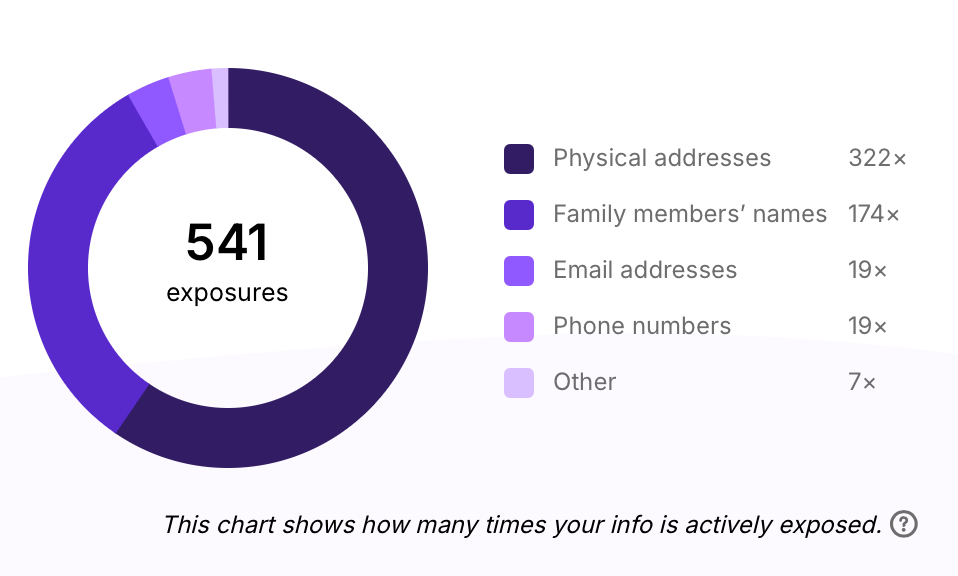
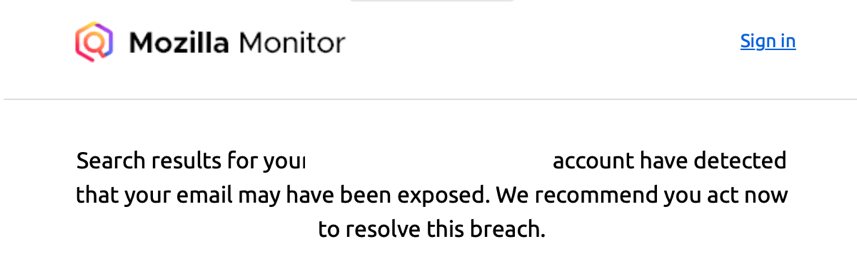
But what I should do with the same 7 actual breaches that had my data found on the Dark Web is never clearly specified. That is because there isn't much you can do. Or what do you think “act now to resolve this breach” means?
Still not convinced? Give this recent article by Ars Technica a read. I feel even more confirmed about what I wrote here after coming across it during research.
If you still think that you need Identity protection, scanning, and perhaps recovery services try and make your decision based on the size of the information set of brokers and people finder sites your prospect provider claims that they can scan and action. If they state an ability to remove Dark Web data, ask them how (and share it with us).
Check your password(s)
If you want to know if your easily remembered and guessed pet name password has already been found compromised ‘;have I been pwned does offer a password check which I find far more valuable than knowing that my name, number, or address can be found on a people finder site.
Thanks for reading and stay (digitally) safe out there!
Originally published on LinkedIn, August 22, 2024. View the original
Some facts, figures and services mentioned here reflect the time this was written, in 2024.